VIDEO
1. Click up carrot and select Video Settings
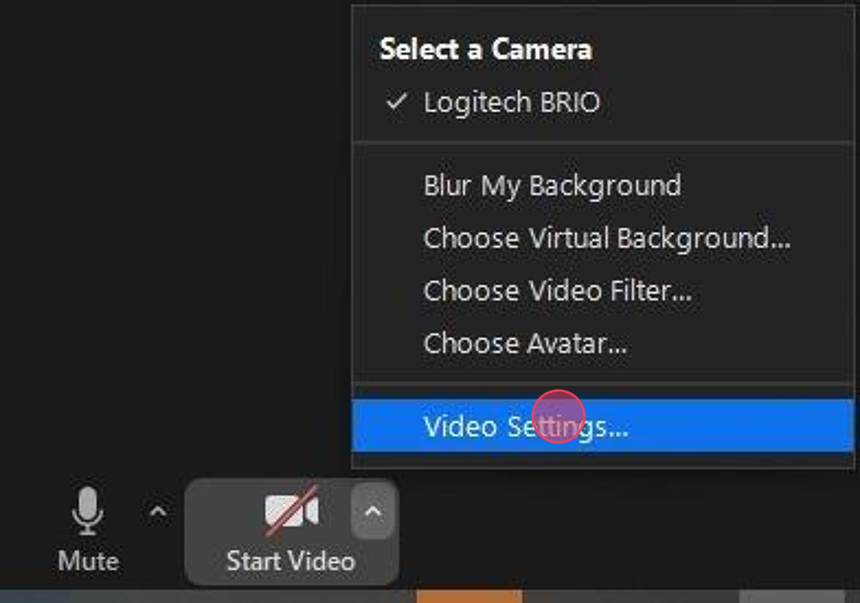
2. Should be able to see yourself
If NOT, check:
- Privacy Lid on Camera itself is open
- Camera is selected in Video options as seen below ex: Logitech BRIO

Audio
1. Test Mic input. Make sure you can hear "Test 1, 2, 3"
If NOT, check:
- headset is powered on and connected. Should see device in drop down. Headset will tell you "Power on, battery, pc connected"
- toggle to different audio source. ex: Poly BT600

2. Speaker output. Test music will play. If not, differ to image below.
**Don't select DELL NVIDIA HIGH DEFINITION AUDIO**

**Helpdesk may ask user to install (if not already) Plantronics Hub Installer.
Found Here >> W:\UserInstall\windows\Plantronics. This will update the firmware on the headset.
**Submit a helpdesk ticket via Zendesk if further assistance is required**